


FREE Cinematic LUT
FREE Cinematic LUT
✅ Instant Download
🎥 Cinematic Footage
⏰ Faster Workflow
Couldn't load pickup availability
Description
Description
After just three weeks of using these LUTs, my Instagram page grew from 3,000 to over 10,000 followers. My videos blew up, and I was flooded with questions about how I grade my footage, so I decided it was finally time to share the exact LUTs I use.
What This LUT Can Do
What This LUT Can Do
I built these LUTs to give your footage a clean, cinematic look fast. No more grading from scratch or spending hours trying to fix flat colours. With a few clicks it will bring out depth, contrast, and rich tones that make your edits stand out instantly.
Compatibility
Compatibility
This LUT works with any camera and any editing software that supports .cube files, including GoPro, DJI, FPV rigs, mirrorless cameras, DaVinci Resolve, Premiere Pro, Final Cut, CapCut Desktop, LumaFusion, and more.
If it shoots video, this LUTs will help elevate it.
What's Included?
What's Included?
Here’s what you’ll have access to instantly:
- Moody LUT
- Vibrant LUT
- Sunset LUT
- Sunrise LUT
- Daytime LUT
- Secret Bonus LUT 🎁
- Full Tutorial / Walkthrough Video 🎥


Easy to Use
Cinematic Footage in a Few Clicks
Easy to Use
Cinematic Footage in a Few Clicks
Easy to Use
Cinematic Footage in a Few Clicks
Easy to Use
Cinematic Footage in a Few Clicks
Easy to Use
Cinematic Footage in a Few Clicks
Easy to Use
Cinematic Footage in a Few Clicks
Easy to Use
Cinematic Footage in a Few Clicks
Easy to Use
Cinematic Footage in a Few Clicks
Easy to Use
Cinematic Footage in a Few Clicks
Easy to Use
Cinematic Footage in a Few Clicks
Easy to Use
Cinematic Footage in a Few Clicks
Easy to Use
Cinematic Footage in a Few Clicks
Easy to Use
Cinematic Footage in a Few Clicks
Easy to Use
Cinematic Footage in a Few Clicks
Easy to Use
Cinematic Footage in a Few Clicks
Easy to Use
Cinematic Footage in a Few Clicks
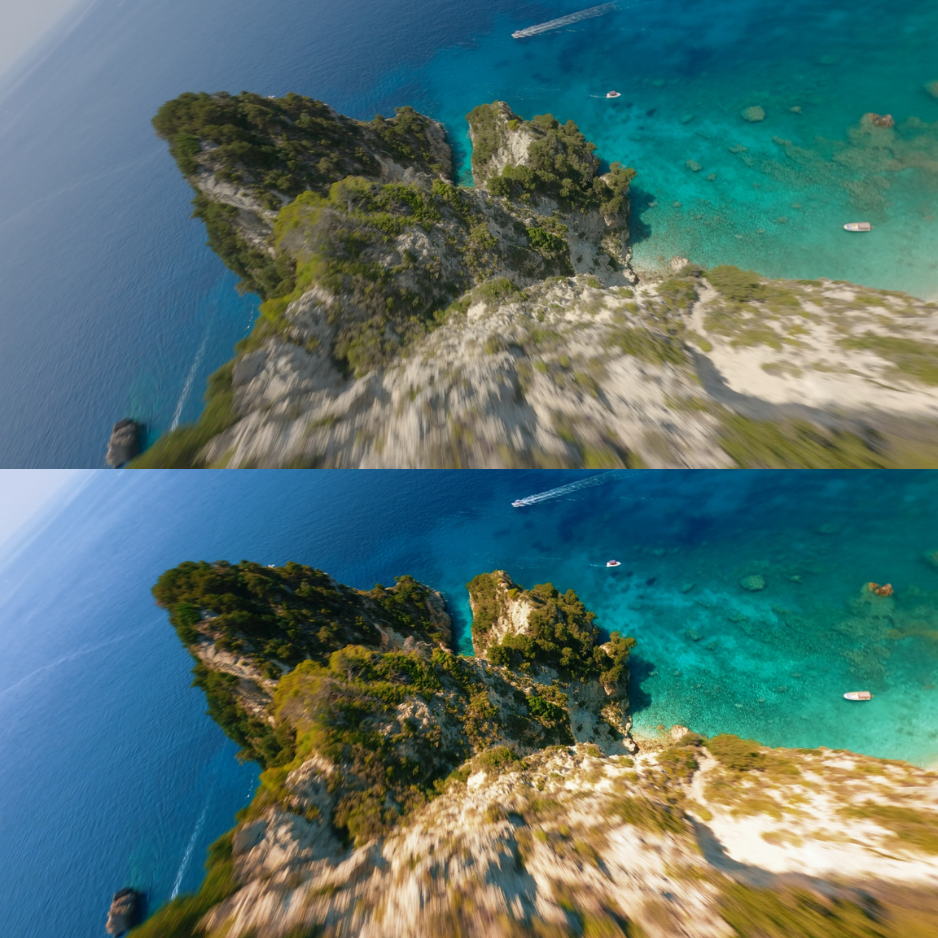
From Flat to Cinematic
Bring your shots to life with colour that finally does them justice. Cleaner skies, richer tones and controlled highlights within minutes.


Easy to Use
Cinematic Footage in a Few Clicks
Easy to Use
Cinematic Footage in a Few Clicks
Easy to Use
Cinematic Footage in a Few Clicks
Easy to Use
Cinematic Footage in a Few Clicks
Easy to Use
Cinematic Footage in a Few Clicks
Easy to Use
Cinematic Footage in a Few Clicks
Easy to Use
Cinematic Footage in a Few Clicks
Easy to Use
Cinematic Footage in a Few Clicks
Easy to Use
Cinematic Footage in a Few Clicks
Easy to Use
Cinematic Footage in a Few Clicks
Easy to Use
Cinematic Footage in a Few Clicks
Easy to Use
Cinematic Footage in a Few Clicks
Easy to Use
Cinematic Footage in a Few Clicks
Easy to Use
Cinematic Footage in a Few Clicks
Easy to Use
Cinematic Footage in a Few Clicks
Easy to Use
Cinematic Footage in a Few Clicks
Frequently Asked Questions
What software does this LUT work with?
They work with all major video editors that support .cube files, including:
- DaVinci Resolve
- Adobe Premiere Pro
- Final Cut Pro X
- Sony Vegas
- CapCut Desktop
- LumaFusion
If your editor accepts LUTs, these will work.
Is this LUT compatible with GoPro and DJI cameras?
Yes, the pack is optimised for:
- GoPro (Hero 9–12)
- DJI Action cameras
- DJI FPV / Avata footage
- Any FPV quad with a mounted action cam
It also works with most other camera brands. You may just need slight exposure/tint tweaks depending on your camera’s profile.
Is this LUTsbeginner-friendly?
100%. This LUT is plug-and-play. Just apply it and adjust intensity to your taste.
What if I’m not familiar with colour grading?
No problem, this LUT is designed to look good instantly.
You only need to adjust:
- Exposure
- White balance
- LUT intensity
And you’re set.